Pinguid: The Handwritten Font That Brings Digital Identity to Life
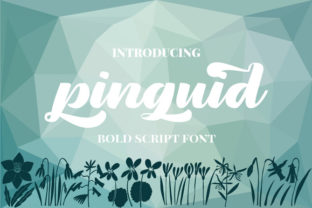
For years, I leaned heavily on clean sans serif fonts for nearly every web project. They felt safe, reliable, and professional. But somewhere along the way, many of my landing pages and brand layouts started to feel interchangeable. That is exactly why I began searching for a display font with genuine character—something that could break the monotony without sacrificing usability. Pinguid is a Script Handwritten font that does exactly that. It carries a fun, bold personality and a whimsical charm that makes any digital design feel more human. When you work with websites, online stores, or app screens day in and day out, finding a typeface that balances expression with legibility feels like a small victory. Pinguid delivers that balance in a way that feels natural, not forced.
What Makes Pinguid Stand Out in Modern Typography
Pinguid is not another neutral script font that fades into the background. It is a handwritten font with thick, confident strokes and a playful rhythm that draws the eye. The letterforms carry a hand-drawn quality that immediately communicates warmth and approachability. For anyone building brand identities or designing digital products, this personality is a valuable asset. The font sits comfortably in the Script Handwritten category, but it avoids the overly decorative fussiness that can hurt readability on screens. Instead, it offers a bold, clear silhouette that works well at display sizes. Whether you are designing a hero header for a creative agency or a product badge for an online boutique, Pinguid gives your typography a memorable voice.
Using Pinguid in Website Headers and Hero Sections
Hero sections are the first thing a visitor sees, and they set the tone for the entire experience. I have tested Pinguid in several hero layouts, and it performs particularly well when used for the main headline. The bold weight and irregular letter shapes create a strong focal point that encourages visitors to stop and read. Because the font feels personal and handcrafted, it immediately signals that the brand behind the site is not generic. For a creative portfolio site, pairing a Pinguid headline with a clean sans serif font for the subheading creates a clear visual hierarchy. The contrast between the expressive script and a neutral body font makes the headline pop without overwhelming the layout.
Call-to-Action Areas and Conversion-Focused Layouts
When I design landing pages, I pay close attention to call-to-action areas. These are the moments where typography needs to guide the user toward a decision. Pinguid works well for short, punchy phrases in buttons or CTA banners. Words like "Join Now," "Get Started," or "Your Story" feel more inviting when rendered in a handwritten style. The font's bold strokes ensure that the text remains readable even at medium sizes, which is critical for conversion elements. That said, I recommend using Pinguid sparingly in CTAs—reserve it for the main action phrase and let a simple sans serif handle the supporting text. This approach keeps the design focused and avoids visual clutter.
Readability Across Devices and Backgrounds
One concern I always have with Script Handwritten fonts is how they will look on small screens. Pinguid holds up better than most because of its thick, consistent stroke width. On mobile devices, the letterforms remain distinct, and the overall shape of each word stays recognizable. I have tested it on dark backgrounds with white text and on light backgrounds with dark text. In both cases, the contrast is strong enough to maintain legibility. For image overlays, adding a subtle shadow or a semi-transparent background layer helps the text stay readable without diluting the font's personality. If you plan to use Pinguid in a responsive layout, keep it for headings and short phrases rather than long paragraphs. That is where it truly shines.
Font Pairing Strategies for a Cohesive Brand Identity
Pairing a decorative display font like Pinguid with the right body typeface is essential for a professional finish. In my own projects, I have found that a clean sans serif font works beautifully as a companion. The sans serif brings structure and neutrality, while Pinguid adds emotion and character. For a more editorial or premium feel, a serif font can also be an excellent match. The contrast between the handwritten strokes and the refined serif shapes creates a sophisticated visual rhythm. When you are building a brand identity, consistency matters. Using Pinguid for logo text, section headings, and accent phrases, then relying on a simple sans serif for body copy and navigation, creates a clear typographic system that users can follow naturally.
Practical Web Applications for Pinguid
I have used Pinguid in several real-world scenarios, and its versatility continues to surprise me. For a boutique online store, the font worked perfectly in product category headers and sale banners. The handwritten quality made the shop feel artisanal and curated. On a coaching website, Pinguid served as the main heading font for the homepage and about section, giving the brand a friendly, approachable tone that resonated with the target audience. For a product landing page promoting a creative course, I used Pinguid in the hero and again in a testimonial pull quote. The consistency helped tie the page together visually. Blog headers also benefit from this font—adding Pinguid to the title of a featured post immediately signals that the content is original and crafted with care.
Decorative Accents and Supporting Typography
Not every element on a page needs to shout. Pinguid excels as a decorative accent in places where you want to add warmth without dominating the layout. Consider using it for drop caps, highlighted quotes, or small section labels. In digital brand kits, it can serve as the signature typeface for social media graphics, email headers, and presentation slides. Because the font has a bold, confident presence, it works well when scaled down for badges or stickers. Just keep the text short—one to three words is ideal. For longer phrases, the handwritten style can become harder to parse quickly, so save it for the moments that matter most.
File Formats, Styles, and Multilingual Support
Before committing to any font for a web project, I always check the available file formats and included styles. Pinguid comes in standard webfont formats that work smoothly across modern browsers. It includes a range of alternates and ligatures, which add variety and prevent the text from looking repetitive. This is especially useful for logo design or any repeated use of the same word. The font also supports multilingual characters, making it suitable for international audiences. When you are designing for a global brand or a site with multiple language options, this coverage saves time and ensures consistency across translations.
Commercial Licensing for Client Projects and Digital Assets
Licensing is one of the most practical considerations when using a premium font in client work. Pinguid is a commercial font, and you need the appropriate license for websites, online stores, landing pages, digital templates, and brand assets. If you are designing for a client, make sure the license covers their specific use case—especially if the font will be embedded via webfont services or included in a digital product like a template or theme. Many designers I know have learned this lesson the hard way. Checking the licensing terms upfront avoids legal headaches down the road and ensures that both you and your client can use the font confidently across all digital touchpoints.
Pinguid has become a regular part of my typography toolkit. It brings a human touch to digital design without sacrificing the structure and clarity that web projects demand. Whether you are crafting a landing page, building a brand identity, or designing a set of social media graphics, this handwritten font gives you the freedom to express personality while maintaining professional readability. For any designer looking to add warmth and individuality to their work, Pinguid is a choice that delivers results.